본문으로 건너뛰기
N

dsh-chat-import

nwflower/dsh-chat-import

13종의 코딩 에이전트(Claude Code, Codex, ChatGPT, Cursor, Gemini, opencode 등)에서 완전한 형태의 대화 기록을 가져와 재개 가능한 DeepSeek Harness 세션으로 만들고, Claude Code로 역으로 내보낼 수도 있습니다.

설치

dsh plugin --profile web add github:nwflower/dsh-chat-import

README

📥 DSH Chat Import

Import 15+ external agent conversation histories into DeepSeek Harness as full-fidelity, resumable sessions — and export / sync back to Claude Code, Codex, Kimi, or a portable interchange bundle.

English 简体中文

npm version npm downloads License: MIT Node.js >= 22.13 CI GitHub stars Listed in Awesome DeepSeek Harness Awesome DSH Plugin dsh.so security Listed in Awesome DSH Plugins

💡 Intro · 🚀 Install · ✨ Features · 🗂 Supported sources · 🛠 Usage · 🔑 Key behaviors · 📚 Docs · ⭐ Star History · 🤝 Contributing

16+ agent sources, one plugin — full-fidelity import into DeepSeek Harness, seamless resume, matrix interop / backup / handoff on the way out.

Qoder CLI

Changelog: CHANGELOG.md · Roadmap: ROADMAP.md · Interchange protocol: docs/INTERCHANGE.md


💡 Intro

dsh-chat-import imports conversation histories from Claude Code, Codex, ChatGPT, Cursor, Gemini, Reasonix, opencode, MiMo Code, ZCode, Grok Build, OpenClaw, Pi Coding Agent, Hermes, Kimi CLI / Kimi Code, Qoder CLI and DSH session logs — tool calls, reasoning and all — as full-fidelity, resumable DeepSeek Harness sessions. Source files are read read-only (never rewritten), the DSH engine is never touched, and every import becomes a fresh session grouped into the workspace of its source cwd.

The reverse direction is covered too: export_claude serializes a DSH session back into a Claude Code JSONL transcript that Claude Code can load with --resume (read-only — your DSH log is never modified), sync_to_claude incrementally appends a session's new turns back to a Claude Code file — guarded, never silently overwriting — and the same matrix extends to Codex rollouts (export_codex) and Kimi wire files (export_kimi), plus a portable interchange bundle (export_bundle / restore_bundle) with SHA-256 fingerprints and cross-machine restore.

Requires Node.js ≥ 22.13, targets dsh 0.1.x (tested on 0.1.0-rc.6 / 0.1.0-rc.7).


🚀 Install

dsh plugin --profile web add dsh-chat-import                    # npm package
dsh plugin --profile web add -w link:/path/to/dsh-chat-import   # local checkout (symlink)

Then:

  1. Import — call any import_* tool in a DSH session:
import_claude({ path: "~/.claude/projects" })
import_chatgpt({ path: "~/Downloads/chatgpt-export/conversations.json" })
import_local_jsonl({ path: "D:\downloads\session.jsonl" })
  1. Resume — refresh the session list, open the imported session, and keep chatting from where the source left off.
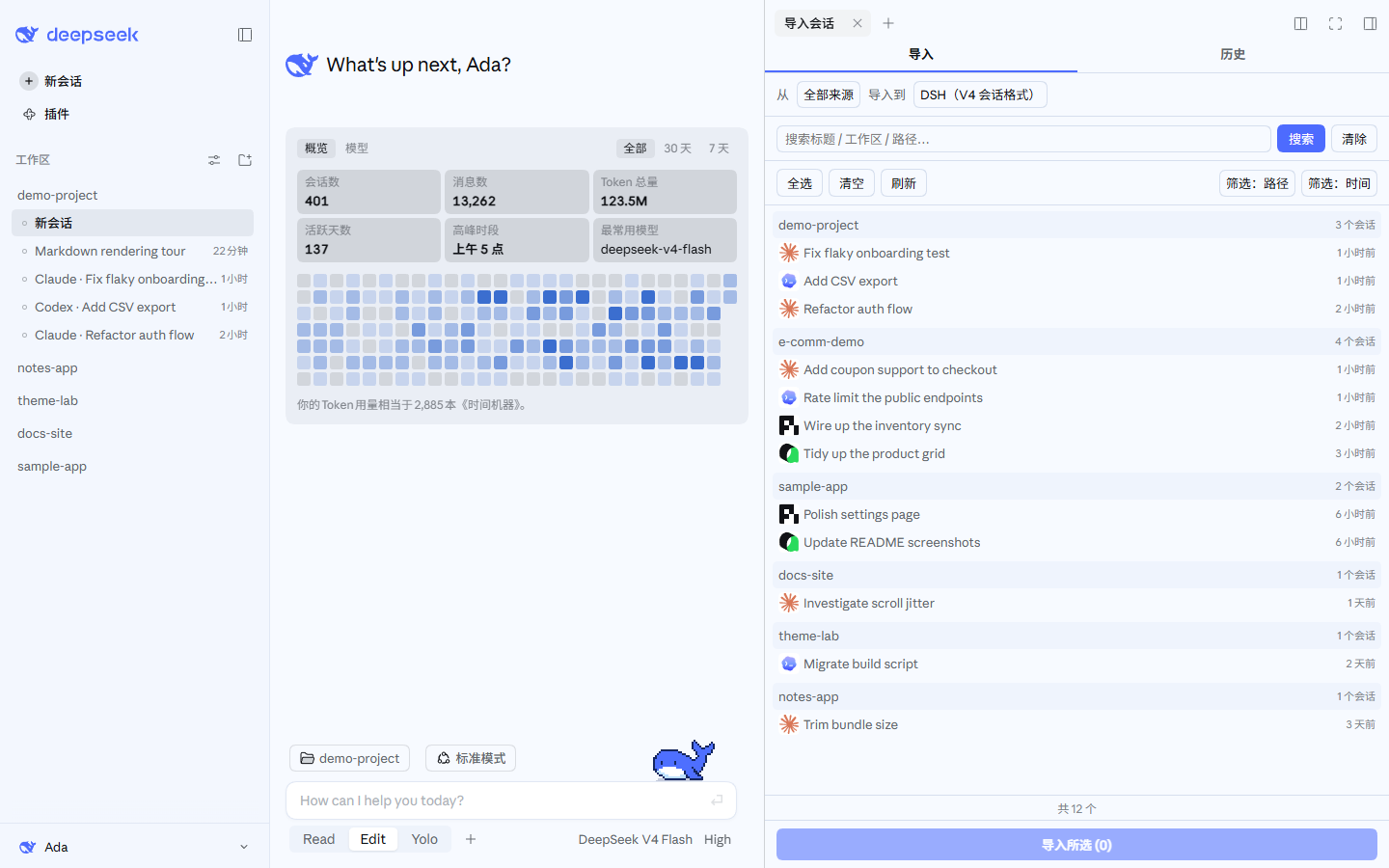
  2. Discover & batchscan_discover() previews read-only; the sidebar "Import sessions" panel browses by workspace and supports multi-select import; /import-all batch-imports everything.
  3. Sync (optional) — the panel's "Sync" tab offers bidirectional incremental sync (external → DSH, DSH → external), default off.

Uninstall: remove the import-claude insert line from your profile's bundles and restart dsh; imported sessions stay untouched and the plugin never auto-deletes.


✨ Features

CapabilityEntry pointsDescription
Batch import from 16+ sourcesimport_* (17 tools) · scan_discover · sidebar panel · /importA file, a directory or a whole database — each conversation becomes its own session
Full-fidelity resumeImported sessionsTool calls & results, reasoning, titles, models and timestamps carry over; sessions group into the source cwd workspace
Matrix exportexport_claude / export_codex / export_kimiSerialize DSH sessions back to Claude / Codex / Kimi formats; every lossy item is reported
Portable backupexport_bundle / restore_bundleInterchange bundle with dual SHA-256 fingerprints, restorable across machines
Incremental write-backsync_to_claudeAppends new complete turns back to a Claude Code file — guarded, never overwriting
Agent asset migrationimport_agentsConverts pi / opencode / Claude / Codex agents, prompts, skills, instructions into persistent DSH skills
MCP mirror planimport_mcp / /mcp-statusReads Claude / Codex MCP servers and generates a reviewable DSH MCP client YAML snippet
Settings translationimport_settings / /settings-suggestTurns Claude settings / Codex config into DSH migration suggestions (read-only)
Handoff summaries/resume-claude / /resume-codexTreats external transcripts as untrusted history and injects a handoff summary into the current session
Read-only audit / checkupverify_session / doctor / CLI dsh-chat-import doctorStructural audit and migration health check
Idempotency & protectionAll import toolsexpectedHash / restamp / context-budget protection; unchanged sources skip, grown sources append
Preset mode + system promptSettings tab in the Plugins sectionImported sessions record the default preset; optional "import system prompt" as a context injection (off by default)

🗂 Supported sources

SourceStorage locationImport tool
Claude Code~/.claude/projects/<slug>/<sessionId>.jsonlimport_claude
Claude-3p (new client)%LOCALAPPDATA%\Claude-3p\claude-code-sessions (metadata → JSONL via cliSessionId)import_claude
Codex / ChatGPT CLI~/.codex/sessions/YYYY/MM/DD/rollout-*.jsonlimport_codex
ChatGPT (web export)anywhere you saved the export — conversations.jsonimport_chatgpt
Cursor~/.cursor/projects/<slug>/agent-transcripts/<id>/<id>.jsonlimport_cursor
Gemini CLI~/.gemini/history/<slot>/chats/session-*.jsonimport_gemini
Reasonix (CLI + desktop)~/.reasonix/sessions/desktop-*.jsonl · %APPDATA%\reasonix\projects\<slug>\sessions\*.jsonlimport_reasonix
opencode~/.local/share/opencode/opencode.dbimport_opencode
MiMo Code (opencode fork)~/.local/share/mimocode/mimocode.dbimport_mimocode
ZCode (z.ai CLI)~/.zcode/cli/db/db.sqliteimport_zcode
Grok Build~/.grok/sessions/<project>/<session_id>/import_grokbuild
OpenClaw~/.openclaw/agents/<agent>/sessions/*.jsonlimport_openclaw
Pi Coding Agent~/.pi/agent/sessions/--<cwd>--/<timestamp>_<uuid>.jsonlimport_pi
Hermes~/.hermes/ (Windows %LOCALAPPDATA%\hermes)import_hermes
Kimi CLI / Kimi Code~/.kimi/sessions/<workdir-md5>/<sessionId>/wire.jsonl · ~/.kimi-code/sessions/<workspaceId>/<sessionId>/agents/main/wire.jsonlimport_kimi
Qoder CLI~/.qoder/projects/<encoded-project>/<sessionId>.jsonl (subagents in <sessionId>/subagents/*.jsonl)import_qoder
DSH session logs~/.dsh/sessions/<encoded-workspace>/<sessionId>/session.jsonl(.zstd)import_dsh
Any local JSONLany .jsonl file / directory (auto-detected)import_local_jsonl

Each import preserves what the source actually records; anything a format cannot preserve is explicitly flagged in the import report. Per-format details and edge cases live in Usage Reference.


🛠 Usage

All import_* tools share the same path semantics: a single file becomes one session, a directory is scanned recursively for batch import. Common options: preview (zero side effects), force (new full copy), sessionId (override target id), expectedHash (SHA-256 verification), restamp (shift timestamps to now), workspaceMode / workspaceDir (grouping control).

import_claude({ path: "C:\Users\<you>\.claude\projects\<slug>\<sessionId>.jsonl" })
import_opencode({ path: "C:\Users\<you>\.local\share\opencode\opencode.db" })
import_local_jsonl({ path: "D:\downloads\session.jsonl", format: "claude" })

import_chatgpt / import_opencode / import_zcode / import_hermes always return batch results — one file / database contains every session, and each conversation becomes its own session in a single call.

Full per-tool / per-command usage lives in docs/USAGE.md.


🔑 Key behaviors

  • Read-only import — source transcripts and databases are never rewritten; imported DSH history is append-only.
  • Idempotent + incremental — unchanged sources skip without re-reading; grown sources append only new turns; shrinking is detected and reported.
  • Auto workspace grouping — sessions land in the workspace of their source cwd (authoritative mapping → slug decode → home-directory sandbox guard; falls back to the source file's directory when the path does not exist locally).
  • Preset mode — imported sessions mount the default preset scope via agents.create and write the default preset id back to SessionHeader.agentPreset, so the UI shows the preset-mode chip exactly like a normal session.
  • System prompt (optional, off by default) — the "Import system prompt" setting (a tab in the settings Plugins section) preserves the source transcript's system / developer prompt as a "context injection" collapsed row, prefixed with a note that the environment changed and tools / permissions / instructions now follow DSH. Claude Code transcripts do not persist a system prompt, so the toggle is a no-op for that source.
  • Fail loudly — malformed lines, suspected secrets, format limitations and export degradations are all reported; every persisted session gets a structural self-check.
  • Sandbox — reading sources or writing exports outside the workspace requires the session sandbox to allow that path.

📚 Docs

DocumentDescription
Usage ReferenceFull parameters, examples and edge cases for every tool / command
Interchange protocolInterchange v1 protocol and bundle format
ChangelogVersion history
RoadmapShipped / planned
ContributingDevelopment setup, commit rules, security & privacy

⭐ Star History

Star History Chart


🤝 Contributing

Contributions welcome — fork the repo, create a feature/<name> branch, and open a PR. Full guide: CONTRIBUTING.md.

  • Tests: npm test · Cross-platform guard: npm run check:linux
  • Repo conventions: AGENTS.md — conventional commits, bilingual READMEs must stay in sync, plugin consumes public dsh host services only, multi-session file-claim protocol.

📄 License

MIT — see LICENSE.

관련 플러그인